THIM — Thailand Digital Arrival Card

A faster, lower-error arrival-card experience for travelers—and cleaner data for immigration teams.

(Scroll)
Arrival card
TM6 → THIM

Thailand’s arrival card, rebuilt as an app: scan a passport, add the whole group, and arrive with a QR.

Role
Senior Product Designer
Context
Immigration platform · Phase 1
Status
Live · iOS ↗ Android ↗
Timeline
Q1 2025
Scope
Sole designer through phase one, then a gradual handover — supporting the next designer as they took over.
Worked with
A PO, a PM and the engineering team
faster than the paper TM6 process
90%
less time per traveler on group submissions
40%
to complete an arrival card end to end
<3 min

(Chapter 1 · Overview)

THIM replaces Thailand’s paper TM6 with an app built for real travel conditions.

On a phone, under time pressure, often in a second language, and sometimes for an entire group. The result is less manual entry for travelers, fewer avoidable mistakes, and smoother case review downstream.

(Chapter 2 · The problem)

Although Thailand already had a web-based digital arrival card, the experience was designed around ideal conditions rather than real travel behavior.

The system assumed that travelers would: In reality, arrival data was often submitted:
Have enough time and attention to complete the formOn mobile devices, under time pressure
Enter their own information carefullyOn behalf of family members or travel companions
Interact with the system in a familiar languageBy international travelers using a non-native language

As a result, small input mistakes at the arrival stage led to rework, manual verification, and delays for immigration officers downstream. The challenge was not simply improving usability, but reducing errors at scale without compromising compliance or enforcement.

Where this came from. Interviews and support tickets — but most of the brief came directly from the Immigration Bureau’s requirements.

(Chapter 3 · Key decisions)

What I chose, and why.

  1. 1

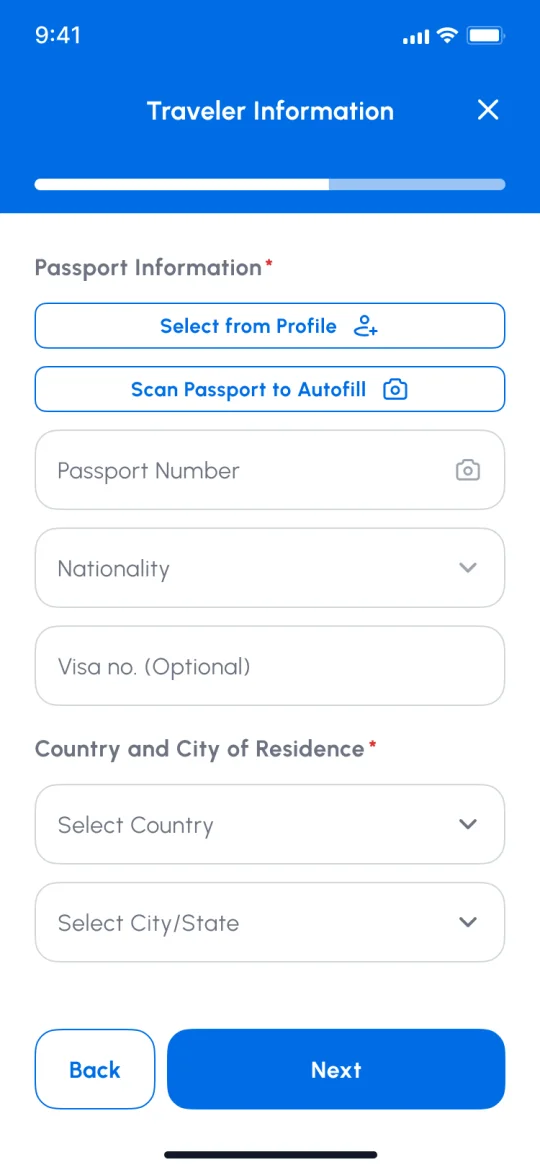
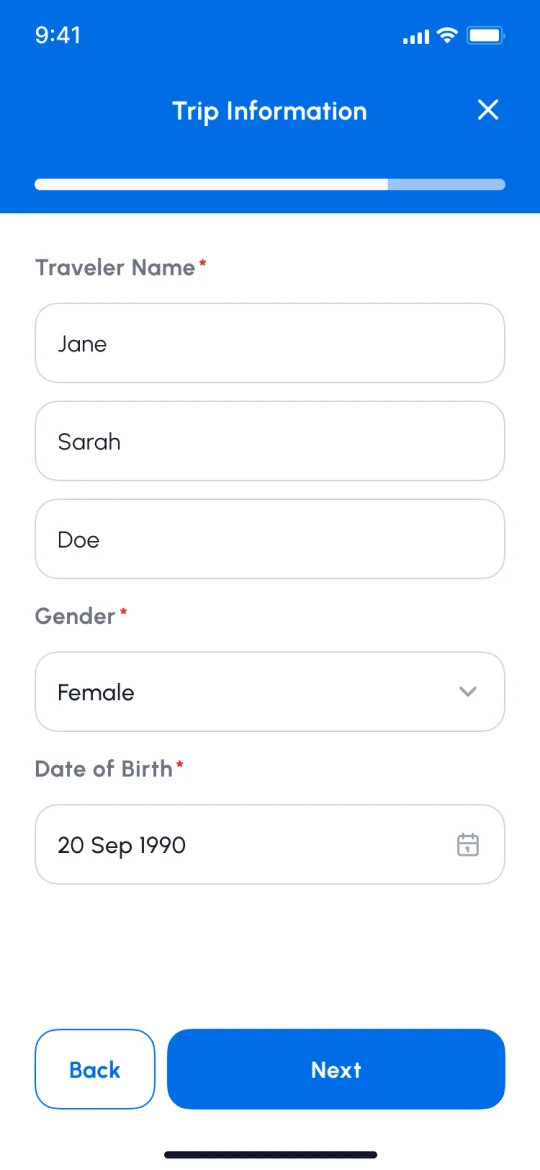
    Make passport scanning the default

    Passport scanning became the primary entry path, pre-filling personal details to reduce manual entry and avoidable errors while giving immigration officers cleaner data.

    • Traveler Information screen: Select from Profile and Scan Passport to Autofill sit above the manual fields
      Scanning is offered before any field
    • Personal details screen with the traveler’s name, gender and date of birth filled in
      Personal details arrive filled, ready to check
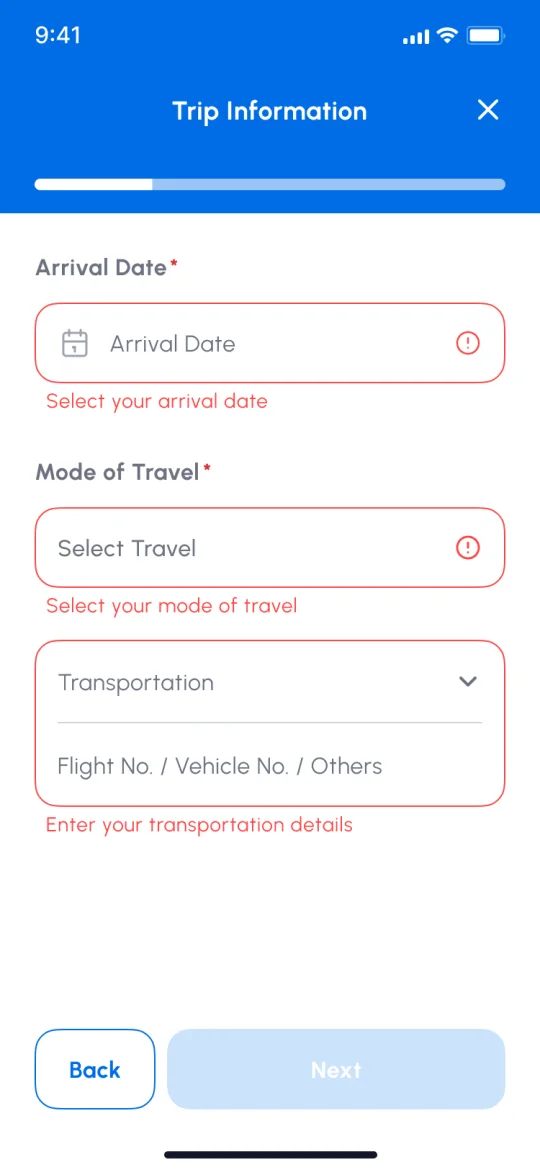
    • Trip details screen with arrival date, mode of travel and transportation each flagged in red with what to fix
      What’s left to type is flagged field by field
  2. 2

    Make group travel part of the core flow

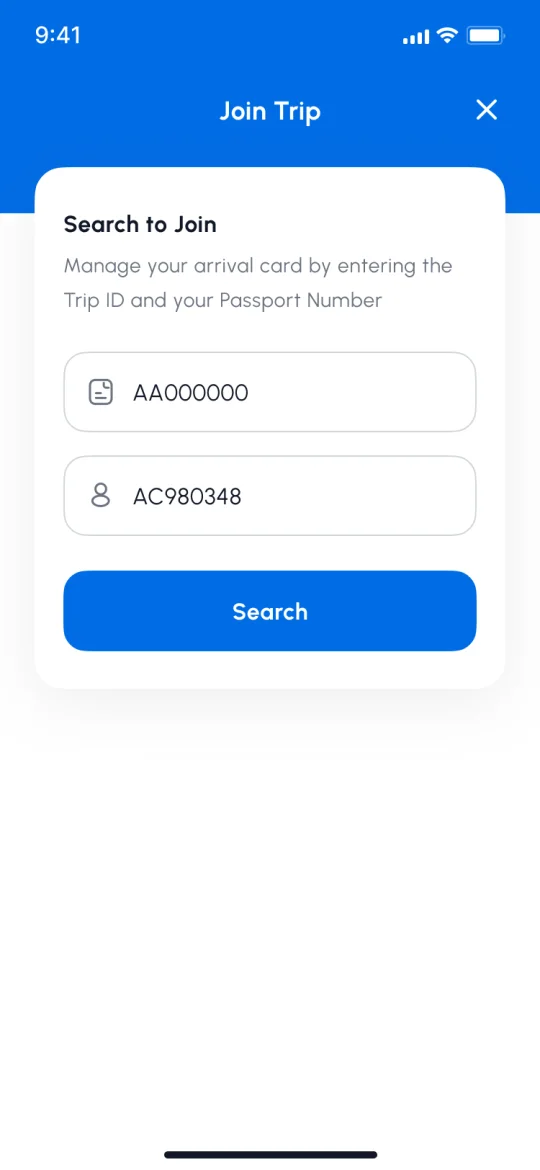
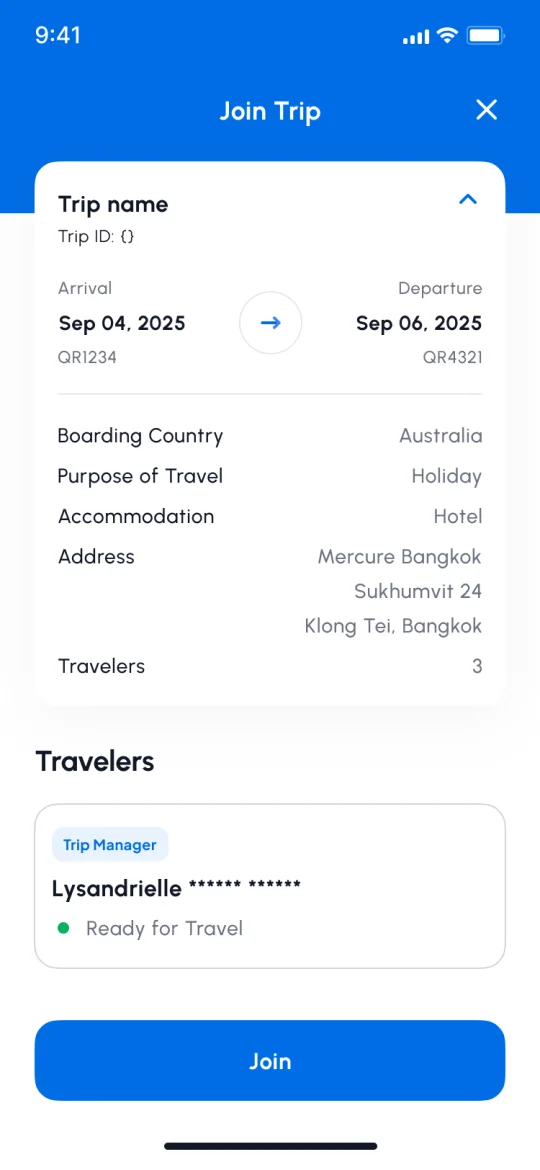
    A “Join Trip” feature lets travelers enter a shared trip via QR code or reference number. Groups enter shared trip details once instead of repeating them for every traveler, reducing duplicate data entry without changing the core process.

    • Join Trip search with a Trip ID and passport number entered
      Find the trip with a Trip ID and passport number
    • Join Trip preview showing the trip’s dates, details and its travelers
      See the trip and who’s on it before joining
    • Success screen: trip joined, manage it from the Trip QR menu
      Joined — nothing re-entered
  3. 3

    Add identity verification only when it is needed

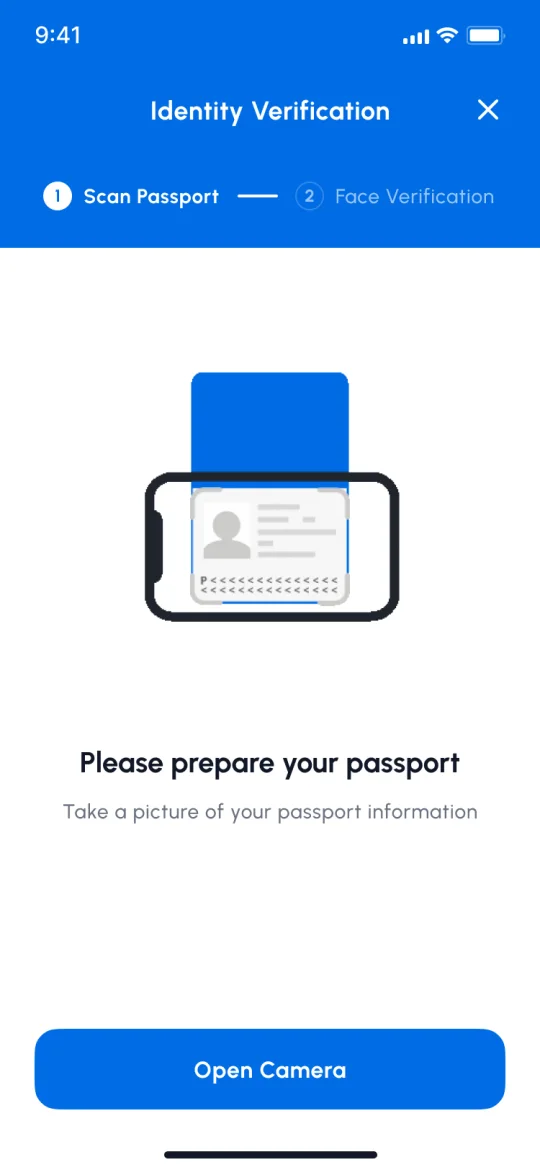
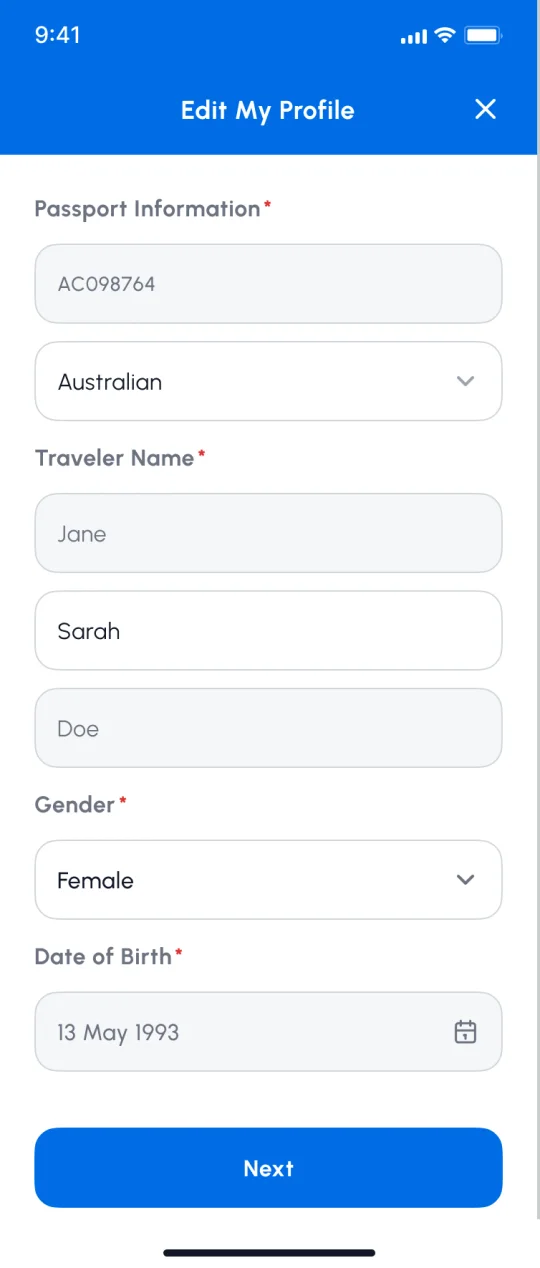
    When required, travelers can complete KYC using OCR, face liveness, and NFC passport-chip reading. Keeping this layer optional preserves a lightweight base flow while enabling verified identity data to support faster case handling and future immigration services.

    • Identity Verification: step 1 Scan Passport, step 2 Face Verification
      Two steps: the passport, then the face
    • Edit My Profile after verification: verified fields are greyed and locked, the rest stay editable
      Verified details lock, so they’re never re-typed

(The flow)

Where each decision lives in the journey

  • Step
  • Optional
  • Check?
  • Done ✓
  • A key decision — select it to read why
  1. Phase 01

    Create arrival card

    1. Start
    2. CreateNew trip
    3. Input tripDetails
    4. PassportInfo1
    5. AddTravelers (optional)or save a draft
    6. Review& confirm
    7. Valid?No → field errors, back to review
    8. SubmitArrival card
    9. CardConfirmed ✓
    10. TripDashboard
  2. From the trip dashboard, the trip is shared with the group
  3. Phase 02

    Share trip & group join

    2
    1. Share tripLink / Trip ID
    2. ConfirmationEmail (QR, Trip No.)
    3. Member clicksInvite link
    4. Has app?No → download the app first
    5. Search trip No./ Passport No.or enter a Trip ID directly
    6. JoinedTrip ✓
  4. KYC for Fast Track — can be started any time after the arrival card is created 3
  5. Phase 03

    Fast Track

    At the airport
    1. Fast Track start
    2. VerifyIdentity
    3. Scan arrivalCard QR
    4. LivenessCheck
    5. Pass?No → redirected to the standard lane
    6. Verify FTDatabase
    7. GateOpens ✓
    8. Enter✓

User flow across Create Arrival Card, Share/Join Trip, and Fast Track.

(Chapter 4 · Group travel)

The saving isn’t a flat number — it scales with the size of the party.

5 travelers

A form per travelerEvery traveler repeats the entire form

10 min

THIMThe trip is entered once, travelers are added to it

6 min

40% less time for this party

Trip details   One traveler’s details  ·  Illustration: about 1 minute per block. Real timings vary.

(Chapter 5 · How I used AI)

As the only designer, I used AI to keep pace — with the words and the prototypes.

One voice. Everyone who touched interface copy wrote it differently. I built a small AI tool that rewrites any line into one voice and tone, and every piece of text passed through it before reaching the design.

Faster prototypes. I built prototypes with AI instead of Figma, so the PO and engineers could click through a flow sooner.

Then vs now. That was 2025. There was no MCP to connect AI to Figma yet, so the design and the prototype lived apart. Today that gap is mostly gone.

(Chapter 6 · Outcome)

Against paper, the arrival card now takes a tenth of the time.

Against paper. The TM6 was filled in by hand at the border. In THIM a complete arrival card takes under 3 minutes, because the passport scan pre-fills almost all of the personal detail — the only part genuinely left to type is the trip itself.

For groups. The trip is entered once and travelers are added to it, so the saving grows with the size of the party (Chapter 4).

Where the friction moved. After launch, most of the friction moved to KYC: verifications that didn’t pass, mostly because the software couldn’t yet read or verify passport data reliably. App Store and Google Play reviews were the clearest signal, and the team has kept improving how quickly and accurately it reads and verifies. That work also unlocks the next step: once an identity is verified, it can be reused instead of re-entered.

(Chapter 7 · What I’d do differently)

I built a system for the words before I built one for the interface.

As the product grew and more designers joined, quality relied too heavily on informal alignment. I introduced a shared voice workflow for content, but not an equivalent component system for the UI. Next time, I’d establish both early—so a growing team can move faster without losing consistency.

(Next project) WORPT Wallet